
Construction As-Builts: What to Record Before Backfill
Construction as-builts show what was installed and connect each change to field evidence before the work becomes hard to inspect. For surveyed infrastructure, record the current permit value, installed value, source file, datum, signed difference, and any governing decision while the structure or pipe is still visible.
What are construction as-builts?
Construction as-builts are the controlled field record of work as installed, including supported departures from the approved drawings and specifications. They may begin as redlined sheets, survey files, inspection notes, photographs, RFIs, and change records. The final form depends on the contract.
The term is sometimes used loosely for a clean CAD set at closeout. In the field, the useful record starts earlier. It preserves who observed a condition, when it was measured, which drawing revision governed the work, and how the final sheet should change.
Caltrans lists changes in length, size, flow line elevations, and station of culverts among data to include on its as-built plans. Its Construction Manual also lists drainage changes and the locations of sewers and conduits. That list applies to Caltrans work; it is a useful example of record content, not a universal project requirement.
When should construction as-builts be recorded?
Construction as-builts should be updated when a field condition is verified, before backfill or another operation removes the chance to check it. Waiting until closeout turns a measured record into a reconstruction from memory, scattered photos, and old emails.
The practical reason to capture the record early is simple: once work is covered, the team may no longer be able to verify its location or condition directly. The owner’s contract, inspection plan, and survey requirements determine the actual capture point and responsible party.
For buried utilities, set the capture point after the installed work is stable enough to survey but before concealment. A manhole can need coordinates, rim and invert shots, connected pipe labels, and a photograph of the open structure. A pipe run may need endpoints, size, material, slope evidence, and ground shots for cover. If a required value is missing, mark it missing. A blank cell must not read as a pass.
What should a construction as-built field record contain?
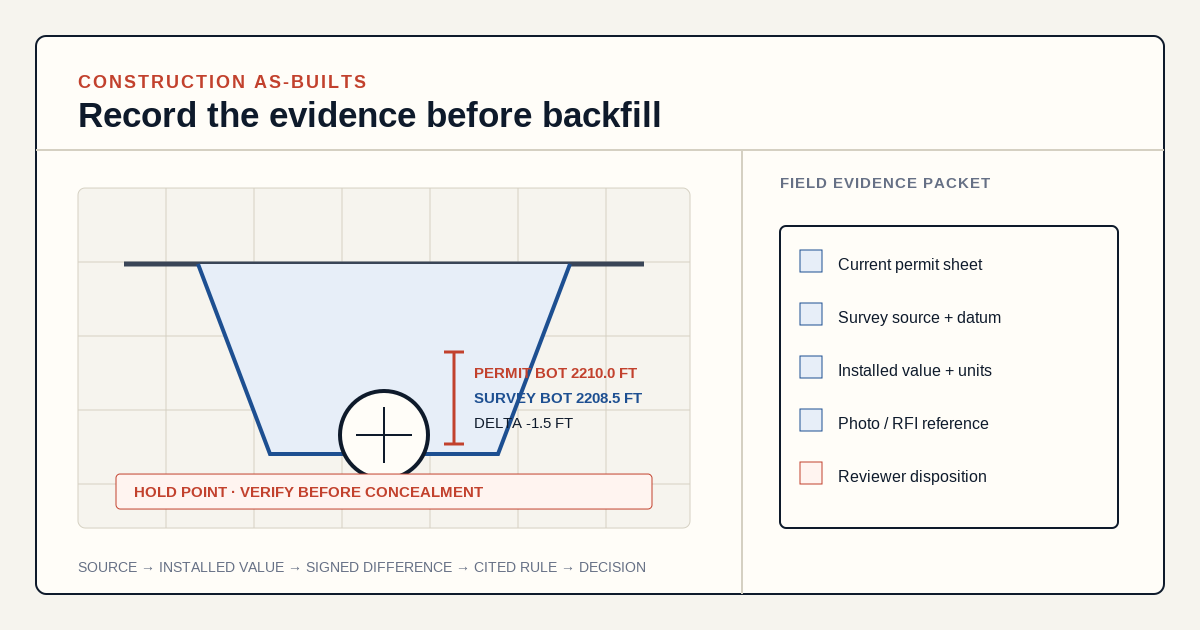
A construction as-built field record should let a second reviewer reproduce the comparison without returning to the trench. Keep these items together:
- Current approved drawing number, sheet, and revision
- Asset name plus the untouched survey point or source-row ID
- Observation date, units, coordinate system, and vertical datum
- Permit value, installed value, and signed difference
- Photo, RFI, work order, or change reference when one explains the condition
- Applicable requirement, reviewer status, note, and responsible person
Preserve source identities before matching asset names. The point-ID and structure-name guide shows why several rim or invert observations may belong to one manhole without becoming duplicate rows.
How do you review surveyed infrastructure against the permit?
A construction as-built review works best as a short evidence chain from approved design to field observation to disposition. Use the following sequence for each structure or pipe:
- Confirm the permit sheet and revision that governed construction.
- Check survey units, coordinate system, vertical datum, observation date, and source identifiers.
- Match the field observation to the intended asset without overwriting its original ID or description.
- Compute the signed difference only for values supported by both sources.
- Apply the project’s cited requirement and keep measured facts separate from the reviewer’s decision.
- Carry the issue ID into the redline and final record, then list unresolved items by owner.
The broader permit-versus-survey review guide covers alignment and a six-pass drawing check. This construction workflow concentrates on collecting the evidence while it can still be verified.
How does a surveyed basin-bottom change become a review issue?
The tracked demo fixture turns one field observation into a reproducible basin-bottom comparison. Its fictional permit model gives BASIN-1 a bottom elevation of 2,210.0 ft, and its generated survey records 2,208.5 ft. Subtracting permit from survey gives 2,208.5 - 2,210.0 = -1.5 ft.
| Record | Value | Evidence | Review treatment |
|---|---|---|---|
| Permit bottom | 2,210.0 ft | Tracked demo permit model | Design value |
| Survey bottom | 2,208.5 ft | Tracked demo survey row | Installed observation |
| Signed difference | -1.5 ft | 2,208.5 - 2,210.0 | Measured fact |
| Disposition | Open | Project rule not yet cited | Reviewer decision pending |
The result is independently checkable from the two tracked fixture values. It shows how the review stores a signed difference; it does not prove a real basin was built low, that a live upload parsed correctly, or that -1.5 ft fails a project requirement. A reviewer still has to confirm the source files, datum, applicable specification, and professional disposition.
What construction as-built worksheet can you use?
A construction as-built worksheet needs one row per supported observation or issue, with enough context to trace the final redline back to the field. Copy this header and example into the project’s approved log:
| Asset and source | Design and installed values | Field evidence | Review and handoff |
|---|---|---|---|
| [asset / point ID / file] | [permit / installed / signed difference / units] | [date / datum / photo or RFI] | [cited rule / status / owner / final sheet] |
| BASIN-1 / source row / demo survey | 2210.0 / 2208.5 / -1.5 ft | [observation date / datum / photo] | [project rule] / open / [owner] / [sheet] |
Do not erase the permit value after a change is accepted. The measured difference and cited evidence explain what was built; the disposition records what the responsible reviewer decided to do about it.
What can AsBuiltReview do with construction as-builts?
AsBuiltReview can organize a first-pass comparison after the permit and survey evidence are ready. The AsBuiltReview features page documents name-based structure matching, unmatched lists, horizontal offsets, rim and invert comparisons, pipe length and slope checks, minimum cover, spec citations, and review deliverables.
The product accepts permit LandXML or DXF and survey CSV, XLSX, or LandXML. DWG must first be saved as DXF or exported as LandXML. Starter limits are placeholders, the rough as-built DXF needs CAD completion, and a licensed engineer confirms every finding. Source inspection supports those described capabilities and limits; it cannot prove a particular live project result.
What do teams ask about construction as-builts?
Construction as-built questions usually concern timing, evidence, measurements, and who can rely on the finished record.
What are construction as-builts?
Construction as-builts are controlled field records that show work as installed, including supported changes from the approved construction documents. The contract and reviewing authority determine the required format, responsibility, and certification.
When should underground utilities be recorded for an as-built?
Record underground utilities after installation can be measured and before backfill hides the work. Follow the project's inspection, survey, and hold-point requirements; the worksheet does not create a new approval step.
What measurements belong on construction as-builts?
For civil utilities, common measurements include structure coordinates, rim and invert elevations, basin bottoms, pipe size and material, run length, slope, cover, connections, and any location that differs from the permit set. Include only values supported by the field record.
Can a photo replace a construction survey?
A photo adds context but usually cannot establish coordinates, datum, elevation, or a repeatable dimension by itself. Pair it with the survey observation or measured tie required by the project.
Can AsBuiltReview certify construction as-builts?
No. AsBuiltReview prepares a first-pass comparison and review deliverables. A licensed engineer confirms every finding, and the product does not stamp, certify, or approve work.