
As-Built Plans Closeout: A Redline Handoff Checklist
An as-built plans handoff should connect every field redline to its source observation, reviewer decision, and final sheet revision. Before closeout, reconcile the issue register with the delivered plan set, identify unresolved items and their owners, and preserve the evidence behind each incorporated change.
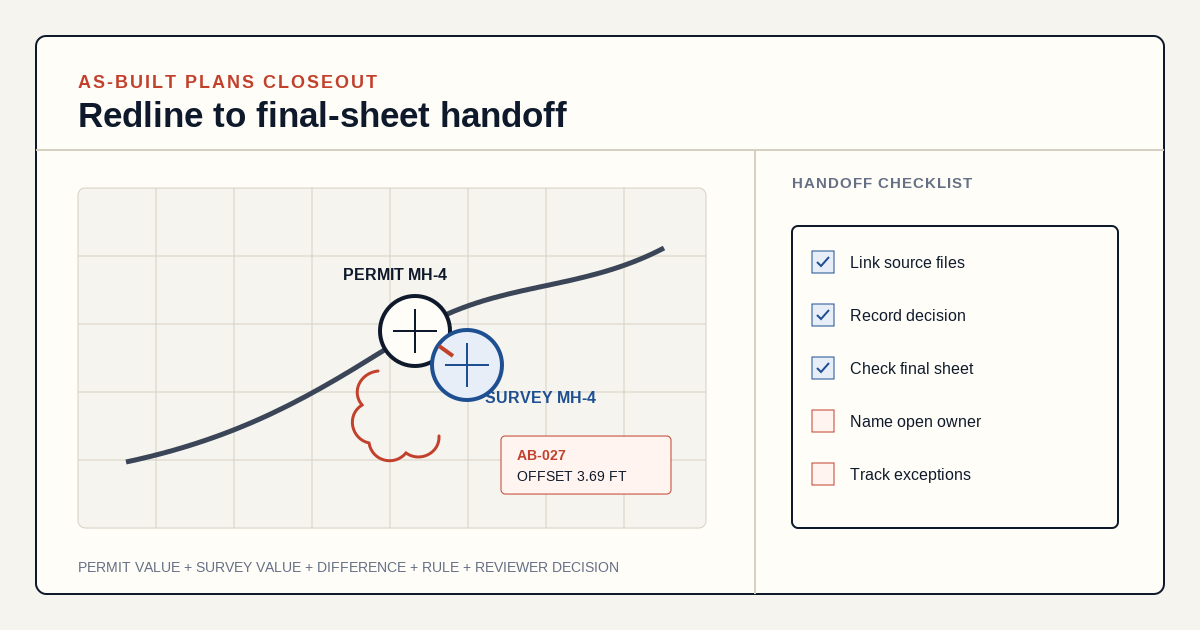
What are as-built plans used for?
As-built plans give owners and reviewers a durable record of installed conditions. In its guidance for federal utility energy service contract projects, the U.S. Department of Energy says as-built drawings reflect the project as approved and completed and are needed to keep facility-condition records accurate. That statement supports the recordkeeping purpose only in the guidance's UESC context; it does not set the content, review cadence, or acceptance rules for every project.
What belongs in an as-built plans handoff package?
Collect the source set and the final deliverables together. A closeout reviewer should be able to trace a redline through the issue register into the exact sheet issued for handoff.
- Permit drawing file, sheet, revision, and approval date
- Survey file, observation date, units, coordinate system, and vertical datum
- Control points used for alignment and the resulting fit information
- Applicable specifications, standard details, and approved changes
- Required deliverable format, certification, and naming rules
- Redline issue register, decision notes, and unresolved-item owners
- Final sheet revision and location where each accepted change appears
A mismatch here can contaminate every later calculation. The broader guide to reviewing as-built drawings against permit plans explains the full six-pass comparison; this checklist focuses on turning field evidence into a reviewable plan record.
How do you reconcile redlines with the final plan set?
Use a handoff pass after the technical comparison. This is a proposed working checklist; the contract and reviewing authority determine the actual acceptance process.
- Inventory the redlines. Give each markup a stable issue ID, source file, and sheet location. Keep superseded markups identifiable rather than silently replacing them.
- Link the field observation. Record the survey file, observation date, units, and datum behind the change. For ambiguous labels, use the survey point ID crosswalk before accepting a match.
- Retain the technical decision. Attach the measured difference, applicable requirement, reviewer, and decision date. A changed status must not erase those values.
- Verify incorporation. Open the final sheet and record its revision and change location. A closed issue in the register does not by itself prove the plan was updated.
- List the exceptions. Name the owner and next action for unresolved items. Follow the project’s process for deciding whether an outstanding item prevents handoff.
Label unresolved findings for the next submittal so each carry-forward record names an owner, the next action, and the evidence a reviewer must verify.
Unmatched assets need their own list. A blank comparison is different from a passing result, and the review record should say which one occurred.
When should you check the handoff record?
Keep the working record current while field evidence can still be checked, then reconcile it with the final package before the project’s closeout decision. A current working set lets the team resolve a missing invert, uncertain pipe connection, or ambiguous structure label while survey crews and construction records are still available.
Set review points around the work that will become hard to observe. Buried utilities deserve attention before backfill. A revised structure name should be reconciled before connected pipe runs inherit the wrong label. At closeout, confirm that earlier redlines made it into the final plan set and that every open item has a named owner. This approach does not replace the project’s inspection or submittal schedule; it gives the drawing record a repeatable quality check inside that schedule.
What evidence should travel with a redline?
Worked fixture example: AsBuiltReview’s tracked fixture gives MH-4 an intended coordinate displacement of 3.25 ft by 1.75 ft. Applying the engine’s horizontal-distance operation gives √(3.25² + 1.75²) = 3.691205765… ft, which rounds to 3.69 ft. The tracked test accepts the analyzed MH-4 offset when it is within 0.06 ft of 3.69 ft.
| Field | Value | Operation | Review meaning |
|---|---|---|---|
| Coordinate difference 1 | 3.25 ft | Tracked fixture | First offset component |
| Coordinate difference 2 | 1.75 ft | Tracked fixture | Second offset component |
| Horizontal offset | 3.69 ft | √(3.25² + 1.75²) | Fixture's rounded distance |
| Status | Open | Compare with cited limit | No compliance decision yet |
Anyone can reproduce the distance calculation from the tracked fixture. The 3.69 ft result does not prove a customer outcome or a real project failure because the fixture is test data, and the calculation alone does not establish the governing tolerance, datum, or professional disposition. Those checks belong in the reviewer’s evidence.
What should a redline-to-closeout worksheet contain?
Copy this worksheet into your handoff log. It adds a final-sheet check and an exception owner to the technical discrepancy register:
| Issue and source | Reviewer decision | Final sheet check | Outstanding action |
|---|---|---|---|
| [ID / asset / source file / datum] | [difference / cited rule / reviewer / date] | [sheet / revision / change location / checked by] | [owner / next action / due date] |
| Illustration: AB-027 / MH-4 / [survey file] | 3.69 ft fixture offset; decision open | Not yet verified in a final sheet | [reviewer] to confirm requirement and disposition |
Keep the measured values when the status becomes accepted, resolved, or waived. The disposition explains what happened after the comparison; it should not erase the comparison itself.
What can AsBuiltReview contribute to an as-built plans review?
AsBuiltReview can prepare a first-pass comparison and organize the resulting review files. Its tracked feature description states:
Structures are matched by name. MH-1 matches MH-1. SSMH #4 matches MH-4. Anything on the permit that the survey does not have is listed, and so is anything in the survey that is not on the permit.
This source passage supports name-based matching and separate unmatched lists. It does not prove that a live file was parsed correctly or that a proposed match is professionally acceptable. The AsBuiltReview features page also describes alignment, elevation and pipe checks, spec citations, redlines, reports, a review log, and a rough DXF.
The boundaries matter: DWG must first be saved as DXF or exported as LandXML, starter limits are placeholders, and the rough DXF needs CAD completion. A licensed engineer confirms every finding.
What do reviewers ask about as-built plans?
Reviewers usually ask what the plans mean, which fields to compare, and how to preserve a decision trail.
What are as-built plans?
As-built plans show the work as installed, including supported field changes from the permitted design. The contract and reviewing authority determine the required content, format, certification, and terminology for a specific project.
What should a reviewer compare on utility as-built plans?
A utility review commonly compares structure locations, rim and invert elevations, pipe sizes, lengths, slopes, cover, connections, and unmatched assets. Only compare fields supported by the survey and the governing requirements.
How should a discrepancy be shown on as-built plans?
Give each discrepancy an issue ID and record the sheet, asset, permit value, survey value, signed difference, cited requirement, status, and reviewer note. Preserve the measured difference when its disposition changes.
Can software approve as-built plans?
No. Software can prepare a first-pass comparison and organize findings, but the responsible licensed professional must confirm the source data, calculations, requirements, and final decisions.