
Request for As-Built Drawings: A File-Ready Template
A request for as built drawings should identify the exact project and drawing issue, the permit or contract requirements, required files, survey basis, coordinate system, units, due date, and delivery method. Ask the sender to distinguish final drawings from field redlines and to list missing or pending items, then acknowledge the files received before technical review starts.
What should you ask for before reviewing as-built drawings?
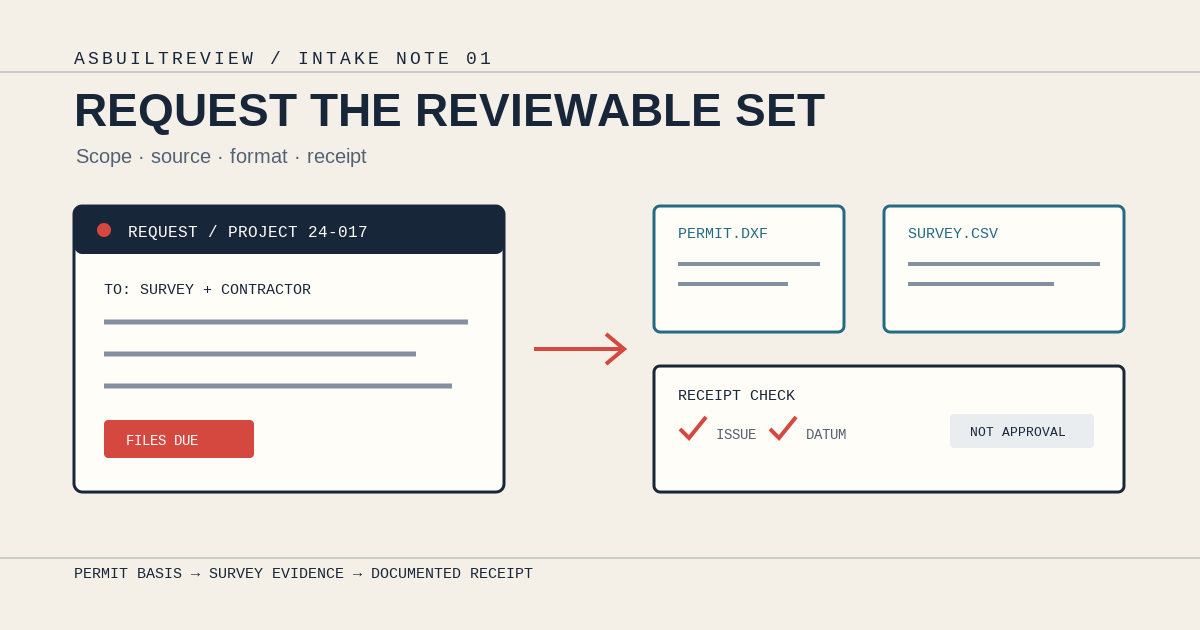
A reviewer should ask for a controlled drawing set, the underlying survey evidence, and enough project context to pair both with the permitted design. Start with the recipient's current checklist, permit conditions, and contract definitions. Those documents decide who must prepare or certify the deliverable and which formats count.
Use a specific drawing identifier: project number, permit number, drawing date, revision, and sheet list. For the survey, request the field date, surveyor or responsible firm, horizontal coordinate reference, vertical datum, units, point descriptions, and any feature-coding notes. If an item is unavailable, ask the sender to mark it “pending” with an owner and expected date instead of silently omitting it.
Check the contract when drawing and specification requirements differ. FAR 52.236-21(a) says specifications govern if they differ from drawings. The clause states: “In case of difference between drawings and specifications, the specifications shall govern.” Read FAR 52.236-21. This example applies to federal construction contracts containing that clause; it does not establish requirements for every city, utility or private project.
How do you write a request for as-built drawings?
A useful request states the purpose, scope, requested files, delivery rules, and response needed from the sender. Copy the template below and replace every bracketed field.
Subject: Request for as-built drawings: [project / permit number]

Please provide the as-built drawing package for [project and limits] by [date].
We will use it to compare surveyed infrastructure with the permitted drawings
and document supported discrepancies. The controlling requirement is
[permit condition / contract section / authority checklist and version].

Please include:
• Final drawing PDF: [required sheets, issue date and revision]
• Native drawing/data: [DXF / LandXML / other required format]
• Survey observations: [CSV / XLSX / LandXML], including point IDs and descriptions
• Survey basis: field date, horizontal reference, vertical datum and units
• Supporting field redlines or change records: [scope]
• Certification or signature: [only when the controlling requirement calls for it]

Use [secure link / project system] and keep the original filenames. In your reply,
list each delivered file and identify anything missing, superseded or still pending.
Questions about scope should go to [name / role / contact].

Receipt of the files will not constitute technical approval or authority acceptance.
Do not request a signature, seal, or certification by habit. Name it only when the governing requirement calls for one, and have the responsible professional determine what is legally required. The request also avoids promising acceptance when the recipient has merely received a folder.
Which file formats should the request name?
The request should name formats that preserve both a readable sheet record and the data needed for comparison. A PDF can show the issued sheet, annotations, and title block. Native CAD, LandXML, or structured survey rows can carry geometry and attributes that a flat page may not preserve.
For a source-backed AsBuiltReview intake example, the tracked features page states exactly:
Permit drawing: LandXML (best for pipe networks) or DXF. As-built survey: CSV, XLSX or LandXML.That product statement supports this request line: ask for a permit LandXML or DXF and a survey CSV, XLSX, or LandXML when the files are intended for AsBuiltReview. It does not prove that a particular export is complete, correctly georeferenced, or accepted by an authority. DWG is not read directly, so the AsBuiltReview features page tells reviewers to save it as DXF or export LandXML before upload.
| Requested item | Why it matters | Receipt check |
|---|---|---|
| Permit drawing issue | Sets the approved comparison basis | Project, date, revision and sheets agree |
| Final as-built PDF | Shows the controlled sheet presentation | Index, title blocks and revision labels agree |
| Native drawing or LandXML | Preserves geometry for measurement | File opens; units and references are stated |
| Survey observations | Preserves measured points and descriptions | Field date, datum, units and source are present |
| Redlines and change records | Explain how field changes reached the final set | Open changes and superseded sheets are identified |
How do you check the delivery without approving it?
A receipt check compares the sender's file list with the request and records gaps without deciding whether the design or construction is acceptable. Save the original message or transmittal, record the arrival date, preserve filenames, and list each file as received, missing, unreadable, superseded, or pending.
Open every file in an appropriate viewer and check that the project, drawing issue, sheet index, units, and survey basis are internally consistent. Do not repair or rename the sender's originals. If a corrected package arrives, retain the earlier transmittal and identify which issue the new one replaces.
Technical review begins after intake. The permit-to-as-built review guide covers alignment, asset matching, calculations, and discrepancy records. If the files are ready for controlled issue after review, the record-drawing release gate shows how to distinguish approved content from the exact delivered file.
What should the receipt response say?
The receipt response should name what arrived, identify gaps, and state the next action without implying acceptance. A short response can read:
Received [date] for [project / permit]:
• [filename], received; [issue / sheets]
• [filename], received; survey date [date], datum [datum], units [units]
• [requested item], missing / unreadable / superseded / pending

Please provide or clarify [gap] by [date]. We have logged this delivery for
completeness review. Receipt does not indicate technical approval, certification,
permit compliance, or acceptance by the governing authority.
This wording creates a clean handoff into review. It also gives the sender a concrete correction list rather than a vague reply that the package is incomplete.
Where does the request workflow stop?
The request workflow stops at a documented, reviewable intake package. It cannot establish that survey points describe the correct assets, that elevations share a datum, that changes meet tolerance, or that a licensed professional or authority has accepted the work.
AsBuiltReview can run a first-pass comparison for supported permit and survey files, match structures, measure offsets and elevations, and produce review outputs. A licensed engineer must confirm every finding. The product does not stamp, certify, or approve drawings, and this template does not replace a contract notice, public-records request, subpoena, or agency submission form.
What do people ask when requesting as-built drawings?
Most questions concern the package contents, file formats, and the difference between receipt and acceptance.
What should a request for as-built drawings include?
Identify the project and controlling permit or contract, requested drawing issue, needed sheets and assets, file formats, datum and units, survey source, delivery method, due date, and the person who can resolve questions.
Should I request PDF and CAD files?
Request the formats required by the contract and receiving authority. PDF helps with sheet review, while native CAD or LandXML can preserve geometry and network data. Do not assume one format can replace the other.
Are field redlines the same as final as-built drawings?
No. Field redlines are working evidence of changes. Final as-built or record drawings are the controlled deliverable prepared from that evidence under the project requirements.
Does receipt of the requested files mean they are accepted?
No. Receipt confirms only what arrived. Completeness, survey traceability, technical accuracy, professional certification, and authority acceptance require separate checks.